Localizing GitHub Repositories with LLMs
Many established software teams work across multiple locations, basing their work on GitHub repositories. Such teams consist of people across different languages and cultures.
It is common practice for large repositories to undergo localization procedures, which involves translating documentation files in such a way that preserve the context of work.
For example, if you had the following Python code in English:
# test the Python print function
print("Hello World")
It would look like this in French:
# tester la fonction print en Python
print("Bonjour le monde")
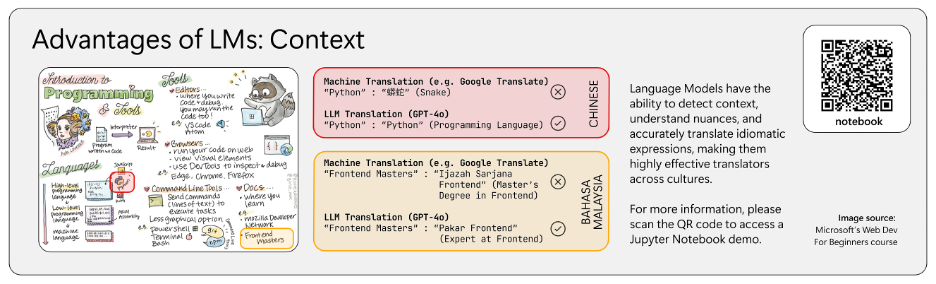
While this is a simple example, there exist small nuances that require us to pay attention to the context of the example. For example, the Python function print cannot be translated into another language. The hash (#), that denotes the comment also has to be left unmodified even during the translation. Paying attention to small details is not something conventional machine translation methods (used in tools such as Google Translate) are developed for.
Given the nature of this work, localization is not a trivial task. At Microsoft, there are localization teams hired to produce culturally and professionally accurate versions of documentation, reports, and guides for codebases. Tasks like these can take up to several months to finish.
Fortunately, this task is something large language models (LLMs) excel at compared to machine translation, as they process tokens of text in a context window. LLMs use attention mechanisms to weigh the relevance of each token relative to others in the sequence, allowing them to capture nuanced meanings and contextual dependencies effectively.
Our team at Imperial College London has worked with Microsoft to realize the potential of LLMs in the localization process, including noting any interesting behaviors and useful takeaways of what is currently possible with existing technologies provided by Azure and OpenAI.
Introducing a Proof-of-Concept GitHub App
As part of the project, our team built a simple GitHub app based off Django and React, with the former framework utilizing Python to quickly build and iterate an app that would look for a configuration file on an installed GitHub repository, and then Markdown files on the repo.
The app opts for a simple configuration:
- We use English as the universal language (although theoretically, we can have this set to any other language). Any translations made by the app are stored in a separate branch that follows the main branch. Every time main is updated by the user, the app pushes to the translation branch and makes a PR to main.
- A yml configuration file lists the directory of the documentation folder and the desired languages to be translated into.
- Any
README.mdfiles in the repository are automatically translated – the translated READMEs are placed in a folder of translations adjacent to the originalREADME.mdfile in English. - All markdown files in the documentation directory are automatically translated. The documentation directory also contains translation folders by language. Each translation folder mirrors the structure of the documentation directory in English.
/project_root
    /docs
        /installation.md
        /screenshot.png
        /api
            /services.md
        /usage.md
        /fr
            /installation.md
            /usage.md
            /api
                /services.md
        /es
            /installation.md
            /usage.md
            /api
                /services.md
        /translated_images
            /screenshot<hash>.fr.png
            /screenshot<hash>.es.png
    /src
        /readme.md
        /readme_img.png
        /translations
            /readme.fr.md
            /readme.es.md
        /translated_images
            /readme_img<hash>.fr.png
            /readme_img<hash>.es.png
Properly Translating a Markdown File
There are three aspects to translating a markdown file:
- Getting the text translations correct
- Getting the code block translations precise
- Translating the images in the Markdown file.
Text Translation
This was a relatively straightforward task requiring minimal prompting – our tests with GPT models were generally very accurate (even with RTL languages like Arabic). At the time of testing, GPT-4o and GPT-4 were accurate most of the time for high-resource languages and performed moderately on low-resource languages. GPT-3.5 performed adequately for common high-resource languages but struggled with low-resource languages.
This article covers a deeper definition of low-resource languages, which tend to be less commonly spoken in the world. Naturally, there is a lack of training data in such low-resource languages used to train language models, which leads to poorer performance in tasks that involve low-resource languages compared to completing tasks in high-resource languages. This behavior is observed in many leading LLMs today, such as from Claude, Llama, Mistral, and GPT. There exist initiatives such as Cohere for AI that try to solve the low-resource language problem with dedicated multilingual models such as Aya, but they are out of the scope of this article.
Code Block Translation
To our surprise, translating code blocks in Markdown came naturally to most LLMs. Since a lot of training data for GPTs consist of a lot of code, the GPT models perform very well on translating comments while preserving the structure of code syntax in code blocks.
Image Translation
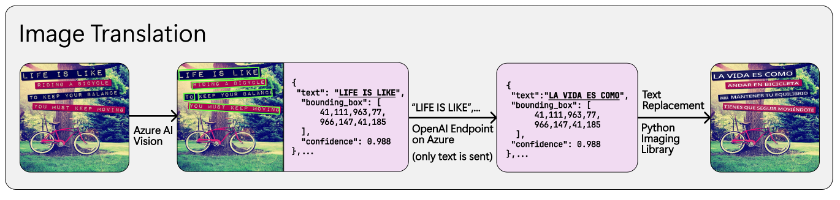
Markdown files can contain images – in most cases these images are stored locally within the repository. All the images in the repository get translated and their translated copies are stored within the repo, and then after the Markdown files are translated, regex is used to find all image links and replace them with their translated variants.
Current state of the art diffusion cannot be reliably prompted to generate translated versions of images due to their probabilistic nature – they are good at generating new images from scratch but cannot imitate the structure of previous images.
Generating new images would also be computationally expensive, so we developed a novel way of using a mix of OCR services and GPT models to translate images:
- Use Azure’s Image Analysis API to detect text lines and their bounding boxes
- Feed the detected text lines into GPT to be translated
- Replace each text line with translated variant
This is not a perfect solution, but text replacement works. It was also agreed with our supervisor that overlaying text would be more legally feasible because there was no generation of new images of similar likeness, which carries copyright implications.
More Detailed Information about the App
- Django backend, React frontend
Translation Process
Installation
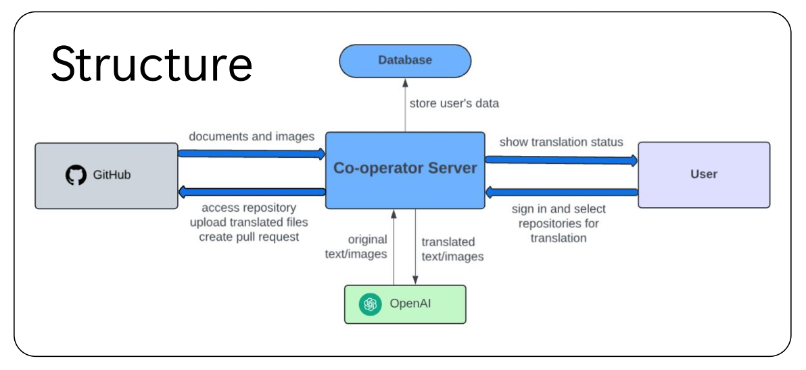
Users start by installing GitHub app on repositories or organization selected, those repositories will be recorded in SQLite database, and displayed on webpage once you logged in. A robot account will be invited to those repositories.
Initial Translation
Once you activate translation on webpage, a new branch “co-op-translator” will be created, then all document files/images will be read and translated by backend server, then uploaded to the new branch. Pull request will then be created from “co-op-translator” to main branch. Note that all changes to repositories will be performed by the robot account, as it’s easier to manage.
Tracking Stage
Repositories will be further tracked. GitHub app is subscribed to events (main branch update, delete of pull requests), modified or added document in new commit will be translated and updated on the “co-op-translator” branch, old pull request will be replaced by a new one.
Edge Cases and Interesting Behavior
- Fixed: The GPT model would hallucinate translated short 1-liner markdown files:
- INPUT:
# Example Hello World in Markdown - OUTPUT (translated into Spanish):
# Ejemplo de "Hello World" en Markdown

Este es un archivo \`README.md\` simple para demostrar el formato de Markdown en GitHub.

## Características

Este documento incluye:
- Etiquetas de **encabezado** (\`#\`)
- **Bloque de código** para resaltado de sintaxis
- Formato en **negrita**
- INPUT:
We tried to prompt the model with the prompt:
“NEVER ADD ANY EXTRA CONTENT OUTSIDE THE TRANSLATION. TRANSLATE ONLY WHAT IS GIVEN TO YOU. MAINTAIN MARKDOWN FORMAT”
This worked, but the model would fail to translate longer files properly. So, we have a dynamic prompt – for files with less than 2 lines, we use the prompt for shorter files, and for files with more than 2 lines, we use the original prompt.
Issues in Image Context: Sometimes due to the way image text is extracted, they are parsed line by line in order of appearance from left to right, then top to bottom. However, this order might not reflect the structure of objects in the text, and sometimes context can be confusing to the model as it has no spatial awareness of the text.
-
Example Image, two cards of text:
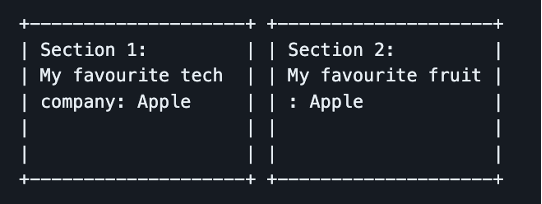
- Extracted Text (-> French translation)
Section 1: -> Section 1: Section 2: -> Section 2: My favourite tech -> Ma technologie préférée My favourite fruit -> Mon fruit préféré: company: Apple -> société: Apple : Apple -> : Apple? Pomme? -
Expected Output
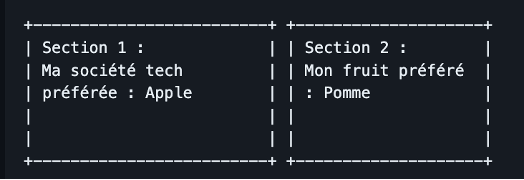
- Actual Output (using line to line replacement)

- Extracted Text (-> French translation)
Note that the translation of “Apple” could be confused between either the company name in French (also called Apple), or the fruit (pomme). Note that there is also a small grammatical error as ‘tech company’ has been split up, so the context has lost track of the lines. This is because ‘tech company’ is reversed in French to be ‘société tech’ or ‘company tech’.
Examples
Take this example, of a Microsoft Guide for Generative AI in English. This is the app’s translated French version. Note that translations do not work with externally linked images.